
Download Brushless – AI Vector Graphics Tool for Designers
Overview
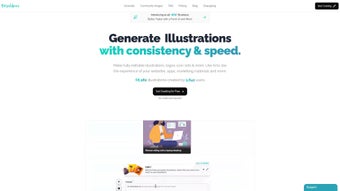
Brushless is a modern, AI‑driven vector graphics generator that lets designers produce high‑quality, fully editable illustrations in a matter of seconds. Built as a cloud‑first platform, the application runs in any contemporary browser, which means there is no need for bulky installations or platform‑specific binaries. Users simply log in, type a natural‑language prompt, choose a style reference, and watch the AI engine synthesize a crisp SVG, EPS, or PDF file that can be instantly tweaked.
The tool is especially valuable for teams that need to maintain strict brand guidelines, because it supports brand‑palette uploads and automatically enforces those colors across every generated asset. Whether you are creating icon sets for a mobile app, hero images for a landing page, or intricate infographics for a presentation, Brushless delivers scalable vectors that retain pixel‑perfect clarity at any resolution. Its intuitive UI is designed for both seasoned graphic artists and non‑designers, offering a low learning curve while still exposing advanced controls for path editing, layer management, and export settings.
By eliminating the back‑and‑forth with external freelancers and cutting down the time spent on repetitive illustration tasks, Brushless helps businesses reduce design costs, accelerate product releases, and keep visual consistency across web, desktop, and print channels.
Key Features
- AI‑Powered Illustration Engine – Generates vector artwork from textual prompts or reference images in seconds.
- Full Editability – Exported SVGs, EPS, and PDFs open in Illustrator, Figma, Sketch, Inkscape, or any vector editor.
- Brand Palette Integration – Upload your corporate colors to enforce consistent hues across all creations.
- Extensive Template Library – Hundreds of ready‑made UI and marketing templates accelerate prototyping.
- Multi‑Format Export – Supports SVG, EPS, PDF, and PNG for web, mobile, and print workflows.
- Cross‑Platform Browser Support – Works on Windows, macOS, Linux, Android, and iOS without additional software.
- Real‑Time Collaboration – Share project links, comment, and co‑edit with teammates in a single workspace.
- Secure Cloud Storage – All assets are encrypted in transit (TLS) and at rest, with optional two‑factor authentication.
- Version History & Snapshots – Automatically records each iteration, allowing you to revert or compare changes.
- Free Tier with Unlimited Downloads – Start creating immediately; premium subscriptions unlock faster AI models and exclusive style packs.
The feature set is deliberately built to bridge the gap between AI convenience and professional‑grade control. The AI engine continually learns from user feedback, so the more you interact with Brushless, the better it predicts your preferred line weights, curvature, and color harmony. Collaboration tools replace endless email threads, offering a live canvas where comments appear in context and changes are reflected instantly for all participants. Security is baked in at every layer, making the platform suitable for enterprises that handle sensitive brand assets. Finally, the free tier eliminates financial barriers for freelancers, startups, and educators, while the subscription model scales with the needs of larger agencies seeking priority processing and custom model training.
Installation, Usage & Compatibility
Because Brushless is a cloud‑native service, there is no traditional installation required. To get started, navigate to brushless.ai, create a free account, and you are immediately presented with an onboarding wizard. The wizard guides you through selecting a design style, entering a descriptive prompt, and choosing output dimensions.
Once the AI generates a draft, you can switch to the built‑in vector editor, where you have full control over paths, nodes, fills, and strokes. The editor includes layer organization, boolean operations, and a live preview of how the design will look on various devices. When you are satisfied, simply click the export button to download the file in your preferred format or push it directly to Google Drive, Dropbox, or OneDrive via the integrated cloud connectors.
Since the application runs entirely in the browser, it is compatible with every major operating system: Windows 10/11, macOS Catalina and later, popular Linux distributions, as well as mobile platforms such as Android 8+ and iOS 13+. The responsive interface adapts to mouse, trackpad, and touch inputs, making it equally usable on desktops, laptops, tablets, and smartphones. For power users, the platform offers a RESTful API (available on enterprise plans) that can be called from CI/CD pipelines to automate batch illustration generation.
Pros
- No download or installation—access from any device with a modern browser.
- AI‑generated vectors are fully editable in industry‑standard design tools.
- Free tier provides unlimited downloads, removing cost barriers.
- Brand‑color enforcement guarantees visual consistency across projects.
- End‑to‑end encryption safeguards intellectual property.
- Real‑time collaboration reduces hand‑off friction.
Cons
- Advanced AI models and higher rendering speeds require a paid subscription.
- Continuous internet connectivity is mandatory for all operations.
- Non‑designers may need a brief tutorial on vector fundamentals to achieve complex edits.
- Large file exports can be slower on low‑bandwidth connections.
To maximize productivity, we recommend watching the introductory video series in the Help Center, which covers prompt engineering, basic path editing, and export optimization. By integrating Brushless into existing workflows—whether you’re using Adobe Creative Cloud, Figma, or a custom design system—you can dramatically cut the time spent on repetitive illustration tasks while maintaining full creative control.
FAQ & Conclusion
Is Brushless really free to use?
Yes. The free tier offers unlimited vector generation and downloads. Premium subscriptions unlock faster AI rendering, exclusive style packs, and priority support.
Can I edit the AI‑generated vectors in Adobe Illustrator?
Absolutely. All exported files are standard SVG, EPS, or PDF formats, which open and edit seamlessly in Illustrator, Figma, Sketch, Inkscape, and other vector editors.
Which browsers does Brushless support?
Brushless runs smoothly on the latest versions of Chrome, Firefox, Safari, and Edge. For optimal performance, use a browser that supports WebGL and modern JavaScript standards.
How secure is my data on Brushless?
All data, including generated vectors and brand palettes, is encrypted in transit (TLS) and at rest. Premium accounts can enable two‑factor authentication for added protection.
Can Brushless integrate with my existing design workflow?
Yes. You can export assets directly to cloud storage services, embed them in Figma or Adobe XD via plugins, and use the REST API (available on enterprise plans) to automate illustration generation within CI/CD pipelines.
In conclusion, Brushless delivers a compelling blend of AI speed, professional‑grade editability, and robust security—all within a browser‑based environment that eliminates the need for complex installations. Its free tier lowers the entry barrier for freelancers, startups, and educators, while the optional premium plan provides faster processing, exclusive style libraries, and advanced collaboration features for larger teams. By supporting every major operating system, offering seamless integration with existing design tools, and ensuring that every vector is fully editable, Brushless empowers creators to produce high‑quality illustrations without the traditional time and cost constraints. If you aim to accelerate your design pipeline, maintain brand consistency, and explore the possibilities of AI‑assisted creativity, Brushless is the tool to adopt today.
Ready to boost your visual production? Download Brushless now and start generating custom vector graphics instantly—free, secure, and fully editable.



.png)



